 SVAYAM
Home theatre and AV quotation software
Home cinema and AV quotes with brand libraries, size drawings and branded proposals.
The live demo runs in your browser on sample data. Nothing you do is saved or sent anywhere.
The problem it solves
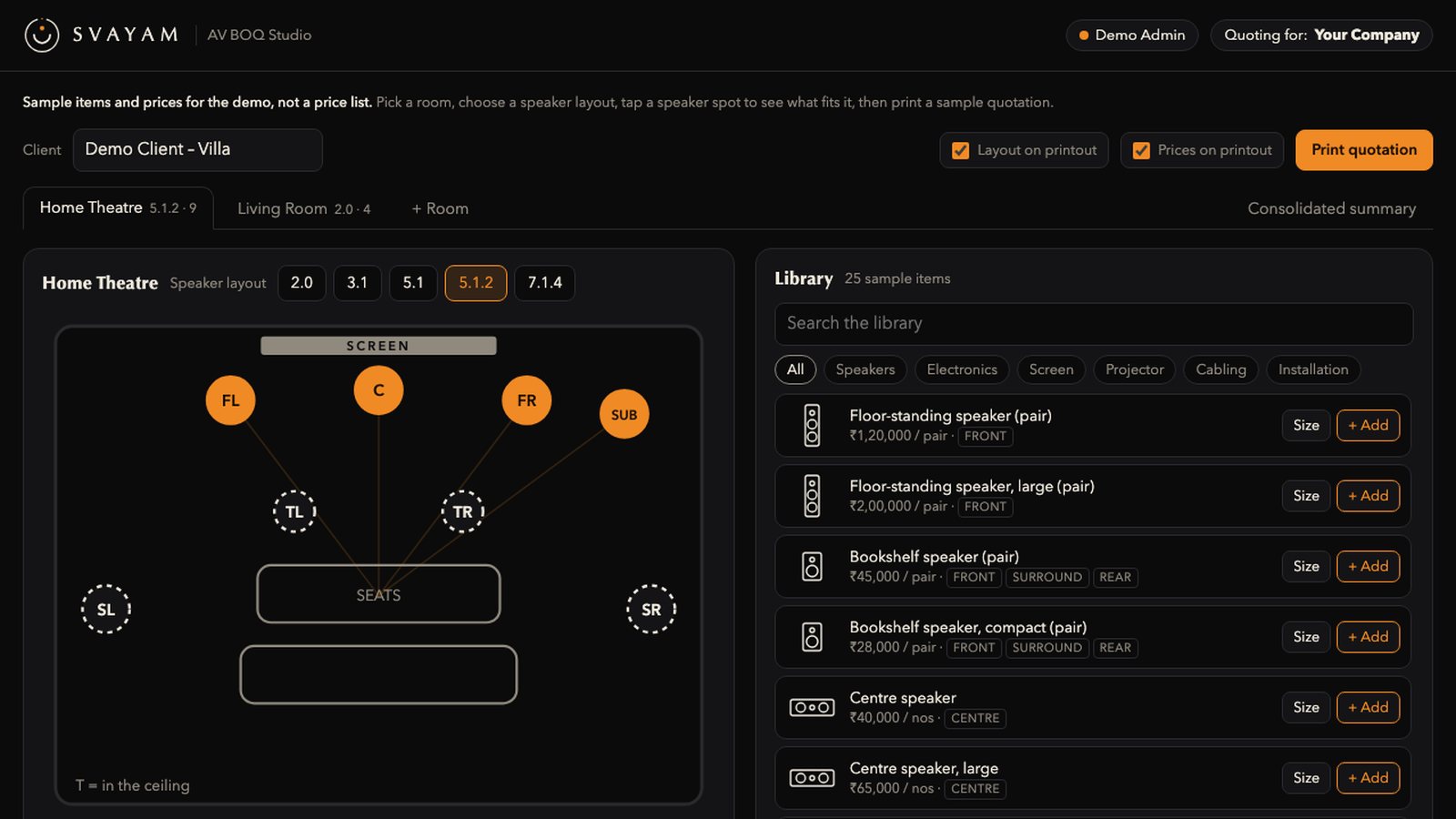
AV quotes need a different structure from lighting/automation: a system configuration like 5.1.2 on top and a flow from main speakers through heights, electronics, screen, projector and cabling. Each quote also has to go out on behalf of a chosen company with its own logo and terms.
What AV BOQ Studio does
System configs on top
Pick the layout (5.1.2 etc.); the quote flows main → sub → height → electronics → screen → projector → cabling.
Room-aware speaker roles
Speakers are assigned front, surround or height automatically from what is in the room; a role picked by hand wins.
Brand device libraries
Devices loaded from brands' own price lists, with filters by slot (Front, Centre, Surround, Rear, Sub, Height).
Size cards with dimension lines
Each product shows a large photo with height, width and depth lines, mm and inch figures and weight.
Company-branded quotes
Each quote is made on behalf of a chosen company, with its logo and terms.
Layout and Prices switches
Turn the speaker-layout map and room views on or off, and hide line prices while keeping room totals.
Consolidated summary
A summary page of package lines per room (speakers, receiver, screen, projector, cabling, installation) before the totals.
Proposals inside the studio
Pick a proposal and company, apply an overall discount, and download the full branded proposal; every download is logged.
Discount on every device
Set one discount across all devices with a live before/after-GST preview, leaving installation lines at full price if you choose.
Direct brand links
Brand links go to the maker's own product or search page, not a generic web search.
Measured, not promised
How it works
Sign in and pick the company the quote goes out from.
Choose the system layout (for example 5.1.2) for each room.
Add devices from the brand libraries; roles and size cards fill in.
Set discounts, and choose whether to show the layout map and line prices.
Download the quote or the branded proposal as PDF, Word or Excel.
Good to know before you start
- Not every device has a sharp photo; series-only or unlisted models are left blank rather than guessed.
- Excel device upload takes the rate as typed (no automatic list-price factor).
- Price basis is unknown for a few brands.
- Some product photos are price-list thumbnails shown enlarged.
Questions people ask about AV BOQ Studio
Can one team quote for more than one company?
Yes. Each quote is made on behalf of a chosen company with its own logo and terms.
Can I hide individual prices?
Yes. Switching Prices off hides every device's rate, discount, amount, GST and total but keeps room totals.
Does it show product sizes?
Yes. Each device card shows height, width and depth in mm and inches, with weight where published.
Which outputs are supported?
PDF, print, Word and Excel.
Is a discount allowed on proposals?
Yes, as a percentage or amount, but a discount below the internal cost floor is refused.
See it on your own project
Every system here is in daily use at Ebullient Automation Pvt Ltd. Try the live demo yourself, then talk to us about setting it up for your team.
- Company
- Ebullient Automation Pvt Ltd
- Address
- A-52, 3rd Floor, Pravasi Industrial Estate, Goregaon East, Mumbai, Maharashtra 400063
- Phone
- +91 70212 11628
- hello@ebullientlife.in